
Multiple mods & translation
How to use multiple mods & translation in Paradox Modding Toolkit.
How the toolkit handles more than one mod at once, dependency mods, workspaces big enough to hurt, translating someone else's mod, and the optional per-mod workspace files.
Working on many mods at once#
Multi-mod workspaces just work. Every workspace folder that looks like a mod of the active game is treated as a mod being edited: definitions AND references are indexed across all of them, so completion, hover, go-to-definition and find-references span the whole workspace. tiger validates the mod that owns the file you save (with a per-mod baseline), and mod-targeted commands (new content, loc editing, translations) act on the mod of the active editor.
A workspace folder that merely contains mod folders also works: its direct children that look like mods are picked up, so you can keep one parent directory with 20 mods and open just that. There is no "primary mod" to configure.
The mod-scoped sidebar views (Mod Overview, Localization Coverage, Overrides & Conflicts, the event graph and the mod report) show one mod at a time: by default the mod of the file you are editing, or pin one with the focus dot in the Project panel (also Paradox: Pick Focus Mod, with a button in the view headers). Switching mods is instant, because everything is indexed once at launch. See Sidebar Views.
To keep 20 mods tellable apart, hovers and completion label definitions with the owning mod's launcher name (from its descriptor) instead of a generic "mod", for example trait group revealed_realm · Cultivation Expanded. Mods without a descriptor fall back to their folder name. The Overrides view also flags definitions that two of your mods declare (launcher load order decides those).
Add folders without leaving the window (0.5.0)#
The folder button beside Project > Workspace Mods, also Paradox: Add Mod or Base Game to Workspace, asks for Documents mods, configured projects, Steam Workshop or the base game. It lists mods for the active game and adds the selection to the current workspace. It rejects duplicate folders, including launcher links that resolve to content already open. The base game remains reference content rather than becoming a workspace mod.
Start Here > Find Existing Mod and Create a Mod instead offer a destination choice: the current workspace or a new window. Use separate workspaces for different games. An added Workshop subscription remains managed by Steam; use your own source copy for persistent changes.
The focus dot and indexing switch have different jobs. A filled dot selects Follow active editor or a pinned mod for the views. The switch excludes a mod from indexing. Mod Overview and Localization Coverage are in Explorer by default; existing custom placements stay where you put them.
Large workspaces: the three indexing tiers#
A total conversion plus a dozen mods costs gigabytes of index, and every VS Code window forks its own language server and builds its own full index, so ten windows on one workspace cost ten times the memory. Past six indexed mod roots, or 10,000 script files under them, the toolkit says so once per workspace and offers the two commands below.
Each mod sits in one of three tiers:
- Fully indexed (the default for a workspace mod): definitions, references, diagnostics, views, tiger. Everything works, and it is the expensive tier.
- Read-only context (
px.parentMods): definitions only. Completion, hover and go-to-definition still resolve into the mod, at a fraction of the memory, because the reference index is the expensive half. This is the right tier for a vanilla-copy pack like an unofficial patch, or a framework mod you load but never edit. - Excluded (
px.excludedMods): nothing at all. No completion, navigation, diagnostics or views.
Paradox: Exclude Workspace Mods from Indexing shows a checklist of the detected mods, and the per-mod index switches in the Project panel do the same thing one mod at a time. After you exclude mods, the toolkit offers Keep as Read-Only Context, which moves them to px.parentMods instead of dropping them. Switching a mod back on pulls it out of px.parentMods too, so the two lists never disagree.
Paradox: Reduce VS Code Indexing Load fixes a different problem: VS Code's own search and file watcher crawl every workspace folder whole, and 62% of a game install is textures, meshes and audio the toolkit never reads. The command writes workspace-scoped search.exclude and files.watcherExclude patterns for binary extensions (.dds, .tga, .mesh, .anim, .png, .bk2, .bank, .wav, .ttf, .otf). Measured on the game plus AGOT, 69,912 files with 43,067 skipped, whole-workspace Find in Files went from 1.7 s warm (up to 106 s when the binaries were not in the OS cache) to a steady 0.65 s.
The patterns match extensions, never directories, so script under gfx/, music/ or dlc/ stays searchable and still re-indexes on save. The write is additive, it leaves your own patterns alone, and the confirmation offers one-click Undo.
docs/PERFORMANCE.md has the measured numbers behind all of this.
Working on submods and compatibility patches#
Read-only parent / dependency mods can be indexed alongside your own. They come from any of three places, all merged, with the first match winning on duplicates:
- Extra workspace folders. Open your submod plus its parent mods in a multi-root workspace (File → Add Folder to Workspace). These are treated as editable workspace mods (see above), which includes everything parents get.
- The
px.parentModssetting (absolute paths, load order, base first). Also what Paradox: Add Dependency Mod (parent mod) writes. <mod>/.px-toolkit/playset.json(below), which is the shareable, per-mod form.
Parent content gets full syntax highlighting and language features, is indexed between your mod and vanilla (so completion, hover, go-to-definition and find-references from your mod resolve into parents), shows up in the overrides view, and re-indexes live when a parent file changes.
Parents reach tiger too. When you validate, your parent mods and the other workspace mods are declared to tiger as load_mod entries, so a submod's references into its parents resolve instead of coming back "unknown". That happens automatically when your mod has no tiger conf of its own; when it has one, that conf stays in charge (tiger reads it directly), so regenerate it with Paradox Tiger: Generate ck3-tiger.conf, which writes the load_mod blocks for you, or add them yourself.
Translating another mod#
Paradox Localization: New Translation Mod (translate another mod) scaffolds a standalone language compatibility mod for any indexed mod (a workspace mod or a read-only parent). Pick the source mod and target language, and it generates a complete mod folder:
- a
descriptor.modwith a dependency on the source mod, - every source loc file mirrored under
localization/<lang>/replace/with blanked values, keeping the original text as# english: ...comments so nothing wrong-language ever ships, - a
playset.jsonso the new mod resolves the source's symbols when opened alone, - a
TRANSLATE.mdwith the workflow, a per-file checklist, and a ready-made AI translation prompt (verbatim rules for preserving$variables$,[script], icons and formatting tags, and matching the official game translation's register and terminology).
Then work through the remaining keys with Translate Missing Keys (one by one), which walks the coverage view's missing list and reports what it wrote and what you skipped (leave a value empty to skip). The Localization Coverage view tracks the rest, since a blank value counts as untranslated.
All three launchers live on that view's title bar: Add Language and Translate Missing Keys as buttons, New Translation Mod in the ... menu.
Current limitation: the translation-mod scaffolder writes a launcher-style
descriptor.mod. That is correct for CK3, but Victoria 3 and EU5 mods use the.metadata/metadata.jsonform, so on those two games you will need to write the descriptor yourself. Everything else the scaffolder produces is game-independent.
To add a language to your own mod instead, use Paradox Localization: Add Language (scaffold files). Since 0.5.0, this can create the first localization file even when the mod has no localization folder. The filename, language header and UTF-8 BOM are written together.
Localization editing, reference navigation and Translate Next use the selected mod, file and language. Looking up a requested translation does not change the completion-language setting or replace missing text with another language. Coverage updates reuse unchanged data and share concurrent reads; changing indexed data invalidates that cache.
The Workshop listing as files#
A mod's Steam Workshop listing is kept as files, so it edits and diffs like the rest of the mod. The default location is <mod>/.px-toolkit/workshop (the setting is px.workshop.dir). It holds description.bbcode, a translations/ folder with one folder per language, a previews/ folder for the preview images, dependencies.json for required DLC and items, and a changelog/ folder for the changenotes.
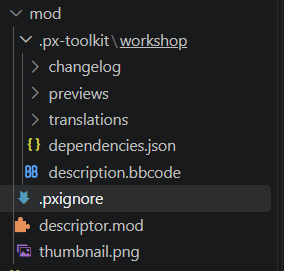
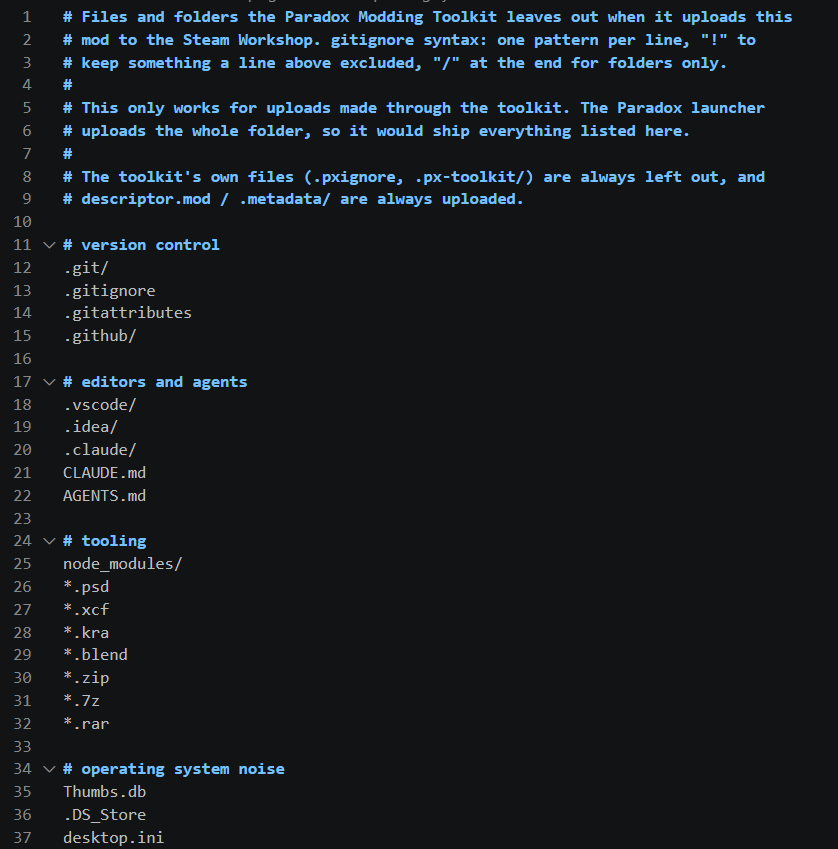
Next to it at the mod root sits .pxignore: the list of what a toolkit upload leaves out of the mod folder, in gitignore syntax. Its header comment says so, and that it applies to toolkit uploads only. The default file is grouped into version control, editors and agents, tooling, and operating system noise.
Workspace files (optional, in <mod>/.px-toolkit/)#
One config folder per mod, the same name on all three games. It replaces the per-game .ck3modding/, .vic3modding/ and .eu5modding/ folders; an existing one keeps working and is renamed the first time the toolkit writes to it. A toolkit upload always leaves the folder out.
playset.json-{ "parents": ["path/to/parent/mod", ...] }: index parent mods so total-conversion submods resolve names correctly. Shareable, unlike a machine-specific setting.schema.json- extend or override the bundled folder schema (folders → kinds → loc requirements) for frameworks the toolkit does not know. This is also the escape hatch for a wrong or missing EU5 folder mapping, since that table is community-sourced (see Supported Games); please file a Schema gap issue as well, so the fix reaches everyone.calendar.json- the mod's display calendar, written by Paradox: Declare Calendar. See Custom Calendars.tiger-baseline.json- written by Paradox Tiger: Create Baseline (snapshot current problems), and<game>-tiger.confby Generate tiger.conf, which a run passes to tiger with--config. A conf you keep at the mod root still wins, because tiger loads that one itself.workshop.jsonand, by default, theworkshop/listing folder. See Steam Workshop.