
Configuration
Settings, keyboard shortcuts, validation and project configuration.
Toolkit Settings (0.5.2 preview)#
In the 0.5.2 preview, open Project > Settings > All settings for a dedicated Toolkit Settings tab. Search settings, filter by category or changed values, choose a sort order, and select User, Workspace or a supported folder scope before saving.
The tab uses VS Code's native settings storage. Drafts remain when switching views. Failed or stale saves report the problem rather than replacing a newer value. Each setting has a reset action. Detected paths, setup and validation actions stay close to the settings they affect.
The native VS Code Settings UI remains available. The reference below also applies to the published 0.5.0 release unless a feature is marked as preview.
Settings live under the px. prefix and are grouped in the VS Code Settings UI under Setup, Mods, Validation and Editor. The default answer to "what do I need to configure?" is: nothing. Open your mod folder(s), run Paradox: Run Setup & Health Check once (see Getting Started), and everything below is optional.
Paradox: Extension Settings (also in the Project panel's overflow menu) opens exactly these settings with the Workspace scope selected, which is where paths and toggles usually belong.
Coming from the old
ck3.*settings? Every one of them moved topx.*in 0.3.0. See Upgrading.
Project controls (0.5.0)#
Project > Settings puts scope inlay hints, suggestion verbosity and hover detail beside the mod controls. Values update immediately, including when changed elsewhere. The controls update an existing workspace override; otherwise they use user settings. I've never created a mod in the tutorial turns on scope hints. Ordinary creation keeps the current preference.
All settings and the game header open native Settings filtered to the toolkit. Recent VS Code builds can show it briefly as a pop-up before the toolkit moves it into an editor tab. This does not change workbench.editor.useModal. Setting that VS Code preference to off removes the pop-up for other affected editors too, not only the toolkit.
Setup#
px.gameId picks the game. The three paths describe whichever game is active, are honored whenever you set them, and are auto-detected per game when left empty. All four are machine-scoped, so Settings Sync does not copy one computer's paths onto another.
| Setting | Type / default | Meaning |
|---|---|---|
px.gameId |
enum, auto |
auto, ck3, vic3 or eu5. auto reads the mod's descriptor shape (descriptor.mod means CK3, .metadata/ plus in_game/main_menu/loading_screen stage folders means EU5, .metadata/ alone means Victoria 3) and is right for almost everyone. Set it explicitly when detection guesses wrong. See Supported Games. |
px.gamePath |
string, empty | The active game's data folder, e.g. .../steamapps/common/Crusader Kings III/game. It powers completion, hover and go-to-definition on vanilla content. Empty means auto-detected via Setup (Steam), or a game folder opened in the workspace. |
px.logsPath |
string, empty | Folder holding the script_docs dump files (triggers.log, effects.log, event_targets.log, modifiers.log). Empty means auto-detect per game: Documents/Paradox Interactive/<game>/logs for CK3, <game>/docs for Victoria 3 and EU5. |
px.tigerPath |
string, empty | Your own tiger binary (ck3-tiger or vic3-tiger, matching the active game). Empty means the copy installed by Paradox Tiger: Download or Update Binary. |
Your own dumps match the engine vocabulary to your exact game version; bundled snapshots are used until you produce them. Launch the game with -debug_mode, run script_docs in the console (`), then run Paradox: Reload Game Data (script_docs).
Games without a tiger build (EU5) skip tiger integration entirely.
Mods#
Every workspace folder that is a mod of the active game is detected and indexed on its own. These settings cover the cases workspace folders cannot express. The paths are machine-scoped; px.locLanguage is not.
| Setting | Type / default | Meaning |
|---|---|---|
px.modPath |
string, empty | A mod folder that is not part of the workspace. Usually leave it empty. Features follow the file you are editing, and the sidebar views follow it too (or a mod you pin with Paradox: Pick Focus Mod). |
px.modProjectsDir |
string, empty | The folder holding your mod projects, the layout that keeps git history, notes and the Workshop listing outside the mod folder. Each mod gets a subfolder there, with the mod content in <project>/mod and the Workshop listing in <project>/workshop, so git history and notes sit next to the mod instead of inside what gets uploaded. The game finds the mod through a link in its own mod folder (a <name>.mod path file, or a folder link for the metadata games). Paradox: New Mod offers this layout and the default one, where the mod sits in the game's own mod folder; it asks for this folder the first time you pick the projects layout. |
px.parentMods |
array of paths, [] |
Read-only dependency mods (absolute paths, load order, base first) for submods and compatibility patches. Their definitions resolve in completion, hover and navigation, but they are never validated or edited. Do not list mods you edit; open those as workspace folders instead. A shareable per-mod alternative is <mod>/.px-toolkit/playset.json with { "parents": ["path/to/parent"] }. |
px.excludedMods |
array of paths, [] |
Workspace mod folders to skip entirely: no indexing, completion, hover, navigation, diagnostics or views. Easiest via the per-mod switches in the Project view, or Paradox: Exclude Workspace Mods from Indexing, which shows a checklist of the detected mods. |
px.locLanguage |
string, english |
Localization language to index and display (matches l_<language> yml files), e.g. english, french, german. |
Validation#
| Setting | Type / default | Meaning |
|---|---|---|
px.tigerRunOn |
enum, manual |
manual (run via Paradox Tiger: Run Validation or the status-bar item) or save (debounced, on every save of a mod script file). |
px.diagnostics.ignore |
array of codes, [] |
Diagnostic codes to suppress everywhere. Applies to the toolkit's own structural and localization codes (e.g. missing-bom, unknown-event) and to tiger report keys (e.g. unknown-field). |
px.diagnostics.ignorePatterns |
array of globs, [] |
Globs matched against workspace-relative paths; all diagnostics (ours and tiger's) in matching files are suppressed. * matches within a path segment, ** across segments, so common/**/vendor/*.txt and *.generated.txt both work. A pattern with no slash also matches the basename, gitignore-style. Matching is case-insensitive. |
px.diagnostics.vanilla |
boolean, false |
Diagnose files under px.gamePath (vanilla game content). Off by default: the toolkit only ever diagnoses your mod's files. |
px.diagnostics.requireDescriptor |
boolean, false |
Report an error, and offer to create the file, when a folder that already holds mod content has no descriptor.mod / .metadata/metadata.json. Off by default, because a folder can legitimately be work in progress. |
Editor#
| Setting | Type / default | Meaning |
|---|---|---|
px.completion.mode |
enum, minimal |
minimal: documented fields with blank values and Tab stops; examples: documented example values; names: keyword only. Explicit definition templates and Insert Snippet remain available in all modes. |
px.hover.detail |
enum, standard |
How much a hover shows. compact is head, facts and provenance only: no prose, no example, one meaning. standard shows everything with caps at 3 meanings, 3 example lines and 2 doc paragraphs. full lifts the example cap, lists every distinct meaning and always shows the scope chain. Longer examples and additional meanings remain available through Examples Wiki or a higher hover-detail setting. |
px.scopeInlayHints |
boolean, false |
Show the inferred scope (e.g. character) after scope-changing block openers like every_vassal = {. Best-effort inference, display only. The first-mod tutorial action enables it; the normal default stays off. |
px.calendar |
object, none | Custom era calendar for total-conversion mods, and the fallback for a mod with no calendar file of its own. See Custom Calendars and the section below. |
px.enableForWorkspace |
boolean, true |
Escape hatch: set it to false to stop this workspace's txt/yml files from being switched to the Paradox language modes. |
px.sidebar.hidden |
array of command ids, [] |
Rows to hide from the Project panel, e.g. px.imageGuidelines. A group whose rows are all hidden disappears with them. Easiest via Paradox: Customize Project Panel Rows, a checklist of Project tool rows only (View, Create, Publish and Info). Utils, Test & Troubleshoot and Paths are not listed. Because the list holds what you hid rather than what you keep, rows added by a later version always show up. See Sidebar Views. |
px.workshop.dir |
string, empty | Where a mod's Steam Workshop listing lives as files. Empty resolves to .px-toolkit/workshop inside the mod, or to an existing workshop folder next to it. See the section below and Steam Workshop. |
px.workshop.changelog |
string, changelog |
Where the Workshop panel looks for changenotes. See the section below. |
px.coaLibraryDir |
string, empty | Folder where the Coat of Arms Designer stores designs as script files, outside any mod, so a design survives the mod it was drawn for. Empty means Documents/Paradox Interactive/<game folder>/px-toolkit/coat_of_arms; the folder is created on the first save, and the designer's folder button writes this setting from a picker. Each file holds one NAME = { … } definition, the same text the designer's copy button puts on the clipboard. See Content Creators. |
px.trace.server |
enum, off |
off, messages or verbose. Traces the LSP conversation for bug reports. |
px.trace.perf |
boolean, false |
Log how long the server spends on each request, file rescan, index change and indexing phase to the Paradox Modding Toolkit output channel. Turn it on when reporting a slow save or slow completion, then paste the perf … lines into the report. |
The calendar: the file first, the setting as fallback#
A mod declares its own display calendar in <mod>/.px-toolkit/calendar.json, which Paradox: Declare Calendar (Display Calendar) writes as an editable example. That file wins over px.calendar, is committed with the mod, and is read wherever the mod is opened, so a multi-mod window shows each mod's own dates and a bare LSP client needs no settings plumbing: the server reads the file itself. The file is validated against a schema as you edit it, and a date hover names which of the two the rule came from.
px.calendar is the fallback for a mod that has no such file. Same shape either way:
"px.calendar": { "epoch": 4000, "after": "AD", "before": "BC" }
epoch is the script year displayed as year 1 of the later era, after labels years from the epoch on, before labels the years underneath it (omit before for a single-era calendar, and give the two eras different labels). An optional months array of twelve strings gives the engine's months your own names: ["Narvinye", "Nenime", …]. Paradox: Generate Calendar Localization writes the matching game-side loc, era math plus date-format overrides, into the mod.
The setting is window-scoped, which decides where it goes. VS Code reads a .vscode/settings.json only when that exact folder is the one you opened, so a calendar declared inside a mod subfolder (<project>/mod/.vscode/settings.json) is ignored and every calendar feature silently stays off. When the toolkit finds such a stray declaration it warns once per workspace and offers Move Into Mod, which writes the calendar file where it counts, alongside a button that opens the ignored settings file.
The Workshop listing folder#
px.workshop.dir resolves against the mod's content folder (absolute paths work too). Left empty it resolves to .px-toolkit/workshop inside the mod, which a toolkit upload leaves out, or to an existing workshop folder next to the mod, which is the <project>/mod plus <project>/workshop layout px.modProjectsDir creates.
The folder is the store the Workshop panel reads and writes: description.bbcode, item.json, dependencies.json, one translations/<language>/ folder per translation with its title.txt and description.bbcode, and previews/ for the gallery. Without it, drafts stay in the mod's workshop.json, and Edit file in the panel creates the folder from those drafts. Paradox: Move Workshop Listing moves it between the two layouts.
One trap in the sibling layout: if your mods live directly in the game's Documents mod folder, every one of them resolves ../workshop to the same path and the listings overwrite each other. The panel warns before creating a folder there.
px.workshop.changelog resolves against the workshop folder (absolute paths work too) and accepts three shapes:
- A folder (the default
changelog): the file named after the descriptor's version wins, so1.2.md,v1.2.bbcodeor1.2.txt. - A single file with headlines: the section under the headline containing the version, so
## 1.2.0in Markdown or[h2]1.2.0[/h2]in BBCode. - A single file without headlines: the whole file.
Markdown is converted to Steam BBCode on the way up (Steam BBCode lists what each construct becomes). The panel's Changenote card offers four sources, Changelog, Release (the newest GitHub release's notes, through gh), Last commit and Write, and the one you pick is what uploads. See Steam Workshop.
The per-mod config folder, .px-toolkit/#
One folder per mod holds everything the toolkit keeps beside your content, on every game: playset.json (parent mods), schema.json (folder-to-kind overrides), calendar.json (the display calendar), tiger-baseline.json, the generated tiger conf (ck3-tiger.conf, vic3-tiger.conf), the GUI preview values, workshop.json and, by default, the workshop/ listing folder.
It replaces the per-game .ck3modding/, .vic3modding/ and .eu5modding/ folders. Existing folders keep working and are renamed the first time the toolkit writes to them. A toolkit upload always leaves .px-toolkit/ out, so your validator settings and listing drafts stay local. See Multi Mod and Translation for what each file does, and Upgrading for the rename.
Launch configurations#
Running the game is configured in .vscode/launch.json, not in settings. A paradox-game launch configuration takes one field, args, the options passed to the game (default ["-debug_mode", "-develop"]), and the extension ships snippets for the common ones. See Running the Game.
Default keybindings#
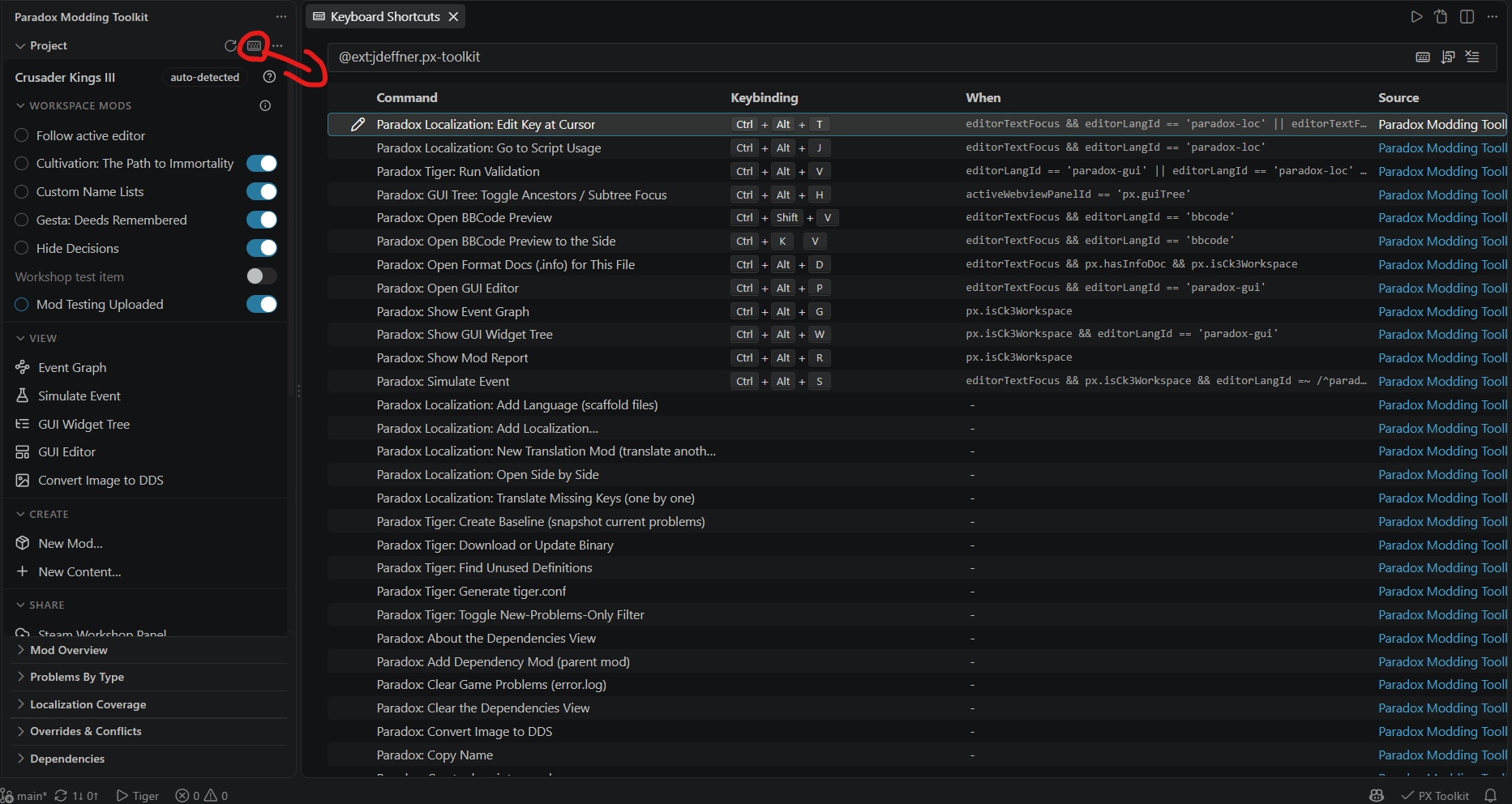
Thirteen chords are bound out of the box, all rebindable like any VS Code shortcut and all inert outside a Paradox workspace or file type. Paradox: Keyboard Shortcuts (this extension), also in the Project view menu, opens the Keyboard Shortcuts UI filtered to this extension.
| Key | Command | When |
|---|---|---|
Ctrl+Alt+T |
Localization: Edit Key at Cursor | in a script or loc file |
Ctrl+Alt+J |
Localization: Go to Script Usage | in a loc file |
Ctrl+Alt+V |
Tiger: Run Validation | in a script, loc or .gui file |
Ctrl+Alt+G |
Show Event Graph | in a Paradox workspace |
Ctrl+Alt+R |
Show Mod Report | in a Paradox workspace |
Ctrl+Alt+S |
Simulate Event | in a script file |
Ctrl+Alt+D |
Open Format Docs (.info) for This File | in a file that has an .info doc |
Ctrl+Alt+P |
Open GUI Editor | in a .gui file |
Ctrl+Alt+W |
Show GUI Widget Tree | in a .gui file |
Ctrl+Alt+H |
GUI Tree: Toggle Ancestors / Subtree Focus | in the GUI widget tree |
Ctrl+Alt+I |
Insert Snippet (definition skeleton, block) | in a script file |
Ctrl+Shift+V |
Open BBCode Preview | in a .bbcode file |
Ctrl+K V |
Open BBCode Preview to the Side | in a .bbcode file |
Ctrl+Alt+<letter> is AltGr on many European layouts (AltGr+L types ł, AltGr+O types ó), which is why the set stays small and avoids the letters that produce characters you type often. Everything else keeps its button and palette entry. The two BBCode chords deliberately match VS Code's Markdown preview keys and only apply inside a .bbcode file.
To see and rebind the rest, open the Keyboard Shortcuts editor filtered to @ext:jdeffner.px-toolkit. Use Paradox: Keyboard Shortcuts (this extension) to open that filtered view.
Inline diagnostic suppression#
To silence a diagnostic on a single line without changing any setting, use a comment:
# px:ignore <code...>on the offending line, or# px:ignore-next-line <code...>on the line above it.
A bare # px:ignore (no code) suppresses every diagnostic on the line, and you can list several codes after the keyword. A trailing -- <reason> is allowed and ignored, so the comment documents itself:
trigger_event = agot_dragon.0031 # px:ignore unknown-event -- defined by the base mod
This works for both the toolkit's own structural checks and tiger's forwarded reports. A code is either one of the codes below or a tiger report key. Malformed comments and bad setting values are ignored rather than treated as errors.
The marker changed in 0.3.0.
# ck3m:ignorecomments no longer suppress anything; the codes themselves are unchanged, so a find-and-replace of the marker is the whole migration. See Upgrading.
Diagnostic codes#
The toolkit's own structural diagnostics carry a stable code. They target the silent-failure class: mistakes that make the game quietly ignore your content with no error output anywhere. The source label is per game (ck3-script, vic3-script, eu5-script).
| Code | Severity | What breaks in game |
|---|---|---|
unclosed-brace |
Error | Everything after the { is ignored |
stray-close |
Error | The engine misreads the rest of the file |
unterminated-string |
Warning | Following tokens get absorbed into the string |
missing-value |
Warning | Assignment has no value; the setting is lost |
missing-bom |
Error for localization; Warning for editable mod .txt scripts since 0.5.0 |
Save the affected document with UTF-8 BOM. The quick fix opens VS Code's encoding picker without discarding unsaved text. |
loc-header-mismatch |
Error | Loc entries do not load (header language and filename language differ) |
loc-no-header |
Error | No l_<lang>: header, so no entries load |
loc-bad-entry |
Warning | Malformed line skipped; the key shows raw |
loc-tab-indent |
Error | Tab-indented entries are rejected |
loc-unterminated-value |
Warning | Loc value with no closing quote |
loc-content-before-header |
Warning | Entries above the header are dropped |
loc-bad-filename |
Error | A file without the _l_<lang>.yml marker is ignored |
wrong-on-action-folder |
Error | common/on_actions (plural) is ignored on CK3 |
wrong-localization-folder |
Error | localisation/ (British spelling) is ignored |
unknown-event |
Warning | trigger_event to a non-existent mod event does nothing |
missing-required-loc |
Warning | The definition shows raw loc keys in game |
Mod descriptors get their own checks under the source px-descriptor:
| Code | Severity | What breaks |
|---|---|---|
descriptor-missing |
Error | The mod folder has no descriptor.mod; the launcher, Workshop and tiger cannot use it (only reported when px.diagnostics.requireDescriptor is on) |
descriptor-missing-field |
Error / Warning | The launcher cannot list the mod (name, version) or check compatibility (supported_version) |
descriptor-unknown-key |
Warning | The key is silently ignored by the launcher |
descriptor-duplicate-key |
Warning | Only the last of the duplicate values counts |
descriptor-path-ignored |
Warning | A path= inside descriptor.mod is dead weight and leaks machine paths |
Every code above has a page of its own, with the in-game consequence, why it happens and how to fix it. Read them inside VS Code from the Wiki row in the Project panel, or in docs/diagnostics/ in the repository.
Anything deeper than structure is tiger's job, by design. Its reports carry tiger's own keys (unknown-field and friends) and suppress the same way.
Diagnostics from the running game#
While the error.log watcher is on, the game's own script errors appear as Problems with the source ck3-game / vic3-game / eu5-game. Those deliberately survive stopping the watcher, so you can work through them with the game closed. Paradox: Clear Game Problems (error.log) removes them, and a "Clear Game Problems (N)" row appears in the Project view while there is something to clear.