
Editor Features
Completion, hover, definitions, references and diagnostics where you write.
0.5.2 preview: CK3 faiths and individual laws are indexed for completion, hover, navigation and typed references, including unsaved edits. Rename remains unavailable for these definitions while indirect references are incomplete. The preview also refreshes scope annotations when game data or schema context changes.
A guided tour of what the toolkit does while you edit. This is not an exhaustive reference (the project is in beta and behavior is still moving), it is meant to show you what is there and when it helps.
Everything here works across your mod, any read-only parent mods, and the vanilla game files, and it is derived from the game's own data so it tracks your patch. Command names below are shown as they appear in the palette; the categories are Paradox, Paradox Tiger and Paradox Localization.
Available in 0.5.0: the editor improvements described below are included in this published release.
At the cursor#
Completion that knows the grammar and the scope. Key positions offer verbs (engine triggers / effects / scope targets plus your own scripted effects and triggers, filtered by whether you are in a trigger, an effect, or a script-value math block). Value positions offer nouns: has_trait = lists traits, trigger_event = lists events, on_actions = { } lists on_actions, loc-valued keys list your mod's loc keys, and prefixes like scope:, var:, culture:, faith:, title: complete their referents. Items valid in the current scope (character vs title vs province, inferred from the block chain) rank first by real-corpus frequency; other-scope items are annotated but never hidden, so you are never blocked by a wrong guess.
Control how much a suggestion inserts. Project > Settings > Suggestion verbosity offers Minimal fields, Full examples and Names only (px.completion.mode). Minimal is the default: documented operators and blank fields with Tab stops, without example values or optional fields. Examples inserts documented example values; Names inserts the keyword. Explicit definition templates and Insert Snippet remain available in every mode. Completion details show an insertion preview and any documented value hints.
Event localization suggestions (0.5.0). CK3 and Victoria 3 can propose a new title, description or option key from the current event ID, including unsaved edits. CK3 uses .t and .desc; Victoria 3 uses .t, .d and .f for flavor text. Option names use .a through .z, skipping names assigned to another option. New keys are labelled, and existing keys remain available. Accepting inserts the reference only; you still write the localized text. EU5 retains existing-key completion without an assumed naming pattern.
Automatic suggestions also work while a script keyword or unquoted value is unfinished. VS Code's word-suggestion setting is respected for Paradox language modes.
Hover docs, merged. Hover a token to see documentation drawn from your script_docs dumps (authoritative, your exact patch) and, on CK3, the bundled wiki lists (so it works before you dump anything), the scopes it supports, the current scope chain at the cursor, and the resolved localization text for a loc key. Hover a .dds path and the texture renders inline (see DDS and Images).
In a huge multi-mod workspace, a word with many same-kind definitions renders as one grouped card ("33 sites") instead of a stack of identical cards, and on an assignment key the key's own structural meaning ranks first.
The card shows what you wrote. Hover a scripted trigger, scripted effect, scripted modifier, script value, scripted list or scripted rule and the card carries its source block, read back out of the file, so you do not jump to read three lines. px.hover.detail sets how much: standard shows the first three lines, full up to 24, compact none.
[ ... ] datafunctions get the same card. GetPlayer and Character.GetName open with the colored kind badge the rest of the product uses (blue for stored values, purple for functions, orange for data types) and the return type on the head line, then the description, the arguments vanilla is observed to pass, and vanilla example sites as links. A body too long for the card says how many more lines exist rather than folding them away inside a widget that closes when the pointer leaves. The full text, and much more about the name, is in the Examples Wiki, which a var: hover also links to directly.
Navigation. Use F12 for definitions, Shift+F12 for references, Ctrl+T for workspace symbols and F2 for rename. Since 0.5.0, definitions and references follow unsaved script and localization text. A trait and a localization key with the same name keep separate identities, as do scripted GUIs and scripted triggers. Same-kind override sites remain available.
Rename only changes supported symbols owned by editable mods. It checks the selected kind, current source text and target name before returning edits. Ambiguous types, stale or unreadable sources, read-only targets and names already used by the same kind are rejected. Graphics and GUI symbols with incomplete reference coverage cannot be renamed. If a declaration repeats its name on one line, put the occurrences on separate lines first.
Scripted triggers and effects declared inline in an event file are indexed too, at any nesting depth, so definition, hover and references work on them even while the vanilla index is still building.
Signature help for $PARAM$s. When you call a scripted effect or trigger, signature help shows its parameters, and completing the call inserts its parameter block ready to fill (paramless ones offer a yes|no choice).
Inline localization. Loc text shows as inlay hints next to keys, a quick-fix lets you edit a key's text in place (writing BOM-correct yml, and routing vanilla-key overrides to localization/replace/), and you can jump between script and loc in both directions (Ctrl+Alt+T and Ctrl+Alt+J). When editing a translation, a reference-language overlay shows the source text.
Mod descriptor support. The launcher descriptor gets its own highlighting, hover docs and completion for every key, with a ready-to-fill example value (for example supported_version offers your installed game version, and tags = { } offers the launcher's category list). A mod folder missing its descriptor gets an error with a one-click Paradox: Create descriptor.mod fix.
Outline, folding and sticky scroll#
Every multi-line {} block is an outline entry, at any depth, so breadcrumbs and sticky scroll follow the whole chain instead of stopping two levels down. Deep inside an event you get the real path:
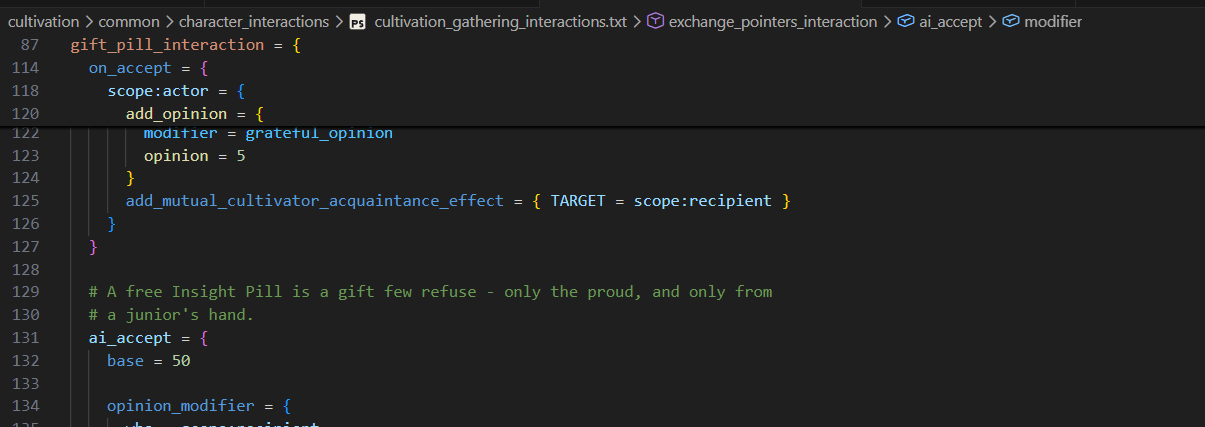
Blocks that are data rather than structure emit nothing (one holding only bare values like traits = { brave shy }, and one that opens and closes on a single line). A block's name shows as its detail.
One glyph per concept. The breadcrumb bar, the outline, sticky scroll and the Ctrl+T symbol search draw their icons from the same kind map as the hover badges and the completion rows, so an event shows the class glyph in all four places instead of a lightning bolt in the breadcrumb alone. The four list kinds stopped sharing one picture too: an ad-hoc add_to_list list draws an array, variable_list an enum member, local_variable_list a plain list, and global_variable_list a globe.
This works in every language the toolkit handles:
- script files: the full nested block chain.
.guifiles: the nested widget tree, withtypes/template/blockoverridedeclarations labeled as such, widgets carrying theirname = "..."as the detail, andtype x = baseshowing its base.- localization
.ymlfiles: thel_<language>:body and comment banners fold. descriptor.mod, outer.modfiles and the bundled_*.infoformat docs get folding and an outline (and nothing else: no diagnostics, no completion).
Diagnostics: the silent-failure class#
The engine's default failure mode is silent: a wrong encoding, a folder typo, or one unbalanced brace makes the game ignore your file with no error at all. The toolkit's own structural diagnostics catch exactly that class, instantly and with certainty:
- unbalanced braces (which make the game ignore the rest of the file),
- missing UTF-8 BOM on a loc file,
- an
l_english:header that does not match the_l_english.ymlfilename, - tabs in loc files,
- folder traps like
common/on_actions(on CK3 it is singular,on_action) orlocalisation/(it islocalization/), - references to mod-namespace events that do not exist,
- schema-required loc keys that are missing.
Cross-file updates (0.5.0). Problems for missing events and required localization update in open scripts when another file changes. This includes unsaved edits, discarding those edits, and creating or deleting a referenced file. You do not need to edit the script that reports the problem to refresh these warnings.
Descriptors get their own checks. Anything deeper than structure is tiger's job, by design. Every code, its severity and its in-game consequence is listed in Configuration, and each code has a page of its own in the Wiki hub (see Examples Wiki).
tiger integration#
tiger is the deep validator. The toolkit auto-downloads it (at your request), and runs ck3-tiger or vic3-tiger depending on the active game. EU5 has no tiger build, so the toolkit says so instead of pretending.
- Run it from the tiger item in the status bar, with
Ctrl+Alt+V, or via Paradox Tiger: Run Validation. Setpx.tigerRunOntosaveto run it on every save (debounced). It ismanualby default. - Reports land as native VS Code Problems, carrying both severity and confidence, with every report location mapped into the editor.
- Dependency mods reach tiger. Your
px.parentModsand the other mods of a multi-mod workspace are declared to tiger asload_modentries, so a submod's references into its parents resolve instead of coming back "unknown". This is automatic when the mod has no tiger conf of its own; when it does, that conf stays in charge (regenerate it, or addload_modblocks yourself). Paradox Tiger: Generate ck3-tiger.conf writes the blocks into the conf it creates. - Adopting tiger on an existing mod with hundreds of warnings? Paradox Tiger: Create Baseline snapshots today's reports and shows only new ones from then on. Toggle New-Problems-Only Filter turns the filter on and off, and it tells you honestly when there is no baseline yet instead of pretending problems are filtered.
- Paradox Tiger: Find Unused Definitions is a one-shot scan for content nothing references.
Simulate an event#
Paradox: Simulate Event (command palette, right-click in a script file, the "Simulate" CodeLens above every event declaration, or from a selected node in the event graph) opens a static walkthrough of an event: its blocks laid out in firing order (trigger, immediate, every option, after), the title, description and option names resolved through your localization, and each block printed back as readable script.
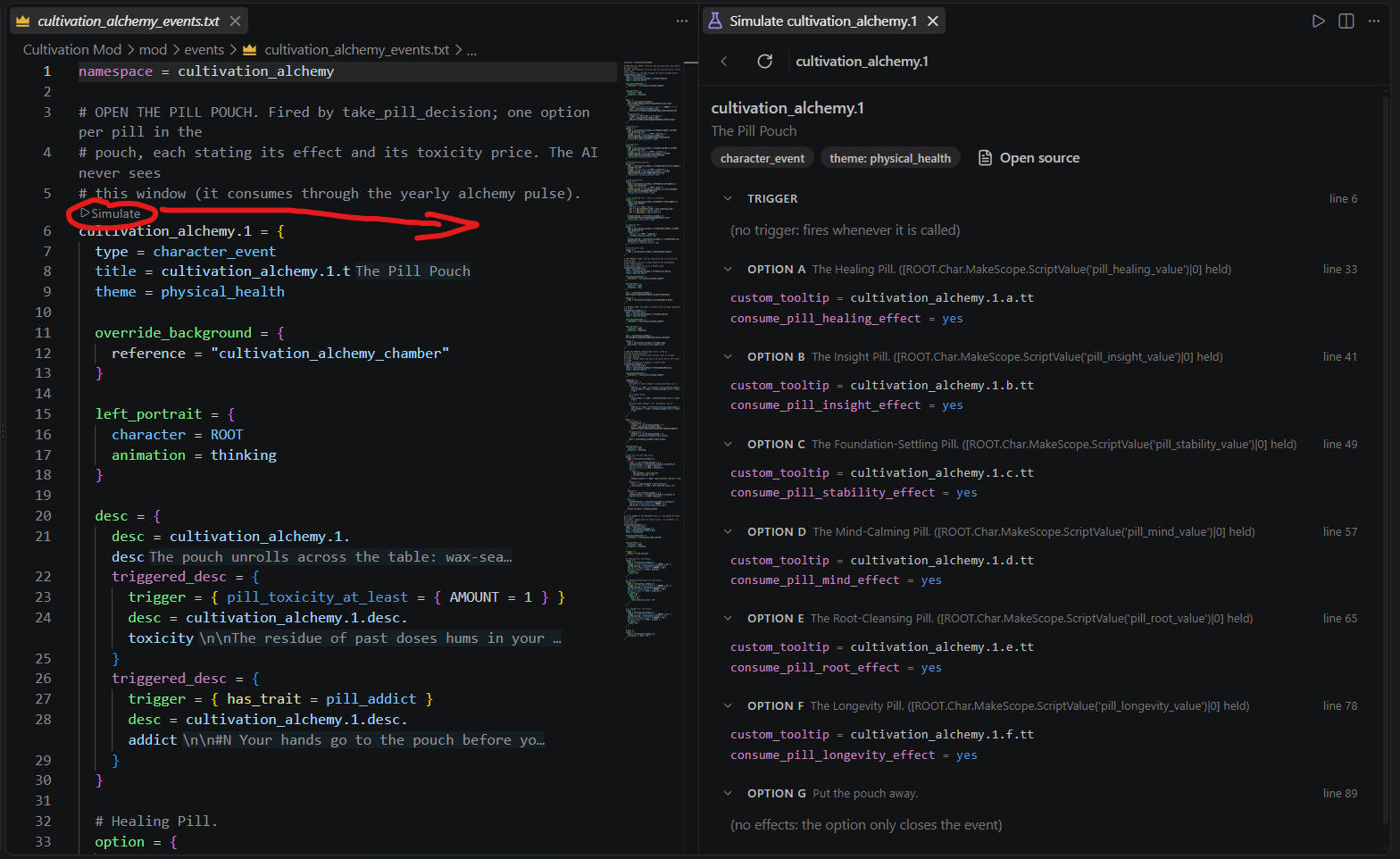
Every onward trigger_event or on_action reference is a step-into link, so you can walk a whole chain with a breadcrumb trail and a Back control without opening ten files. Clicking a block heading or any line jumps to it in the editor. Middle-mouse drag pans.
Nothing is simulated that the files do not say: a reference to an event that is not indexed is labeled unresolvable rather than guessed at, and a block longer than 60 lines says how many lines it hid. It reads each game's own event vocabulary, so a Victoria 3 event shows its flavor line and walks its cancellation_trigger in place.
File actions and encoding (0.5.0)#
Applicable toolkit actions appear directly in editor and Explorer context menus with a PX: prefix. Select files for image conversion, or use the relevant script, definition and GUI actions at their source.
A mod script .txt file without a UTF-8 BOM gets a warning; localization files without one get an error. The Save as UTF-8 with BOM quick fix opens the affected document's native encoding picker. Choose Save with Encoding, then UTF-8 with BOM. This uses the current editor text, including unsaved changes. Other script extensions are not covered by the .txt warning.
Workflow commands#
Paradox: New Content (event, decision, …) scaffolds events, decisions, interactions and on_action hooks that are correct by construction: right folder, BOM'd loc stubs, namespace declared, and on_action hooks written as appends (never overwriting a vanilla on_action).
Paradox: Launch Game (debug mode) starts the game, and Paradox: Toggle error.log Watcher streams script errors from the running game into the editor as squiggles as they happen, including the multi-line
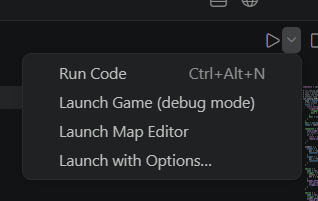
Script system error!blocks (theError:line becomes the message, the location line supplies file and line). Paradox: Clear Game Problems (error.log) clears them when you are done.Launching also sits on the Run button in the editor title of a script file. Its dropdown holds Run Code, Launch Game (debug mode), Launch Map Editor and Launch with Options….
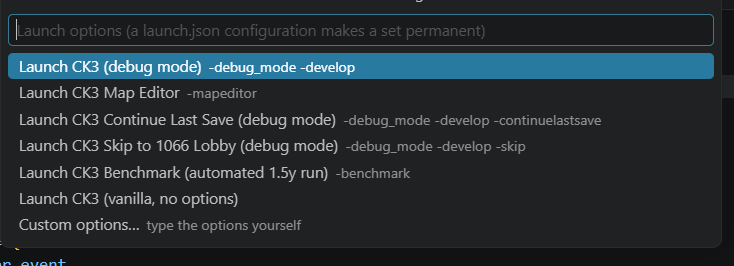
Launch with Options… opens a quick pick of the game's presets, each showing the flags it passes: debug mode, the Map Editor, Continue Last Save, Skip to 1066 Lobby, Benchmark, plain vanilla, and Custom options… to type the flags yourself.
Translation: scaffold a whole language with Paradox Localization: Add Language (scaffold files), then work through it with the coverage-driven Translate Missing Keys (one by one) loop. To translate someone else's mod, New Translation Mod (see Multi Mod and Translation).
Paradox: Show Dependencies of Definition at Cursor lists what references a definition and what it references.
Paradox: Open Format Docs (.info) for This File opens Paradox's own folder schema doc for whatever you are editing, side by side (CK3 only, the other games ship no
.infodocs).
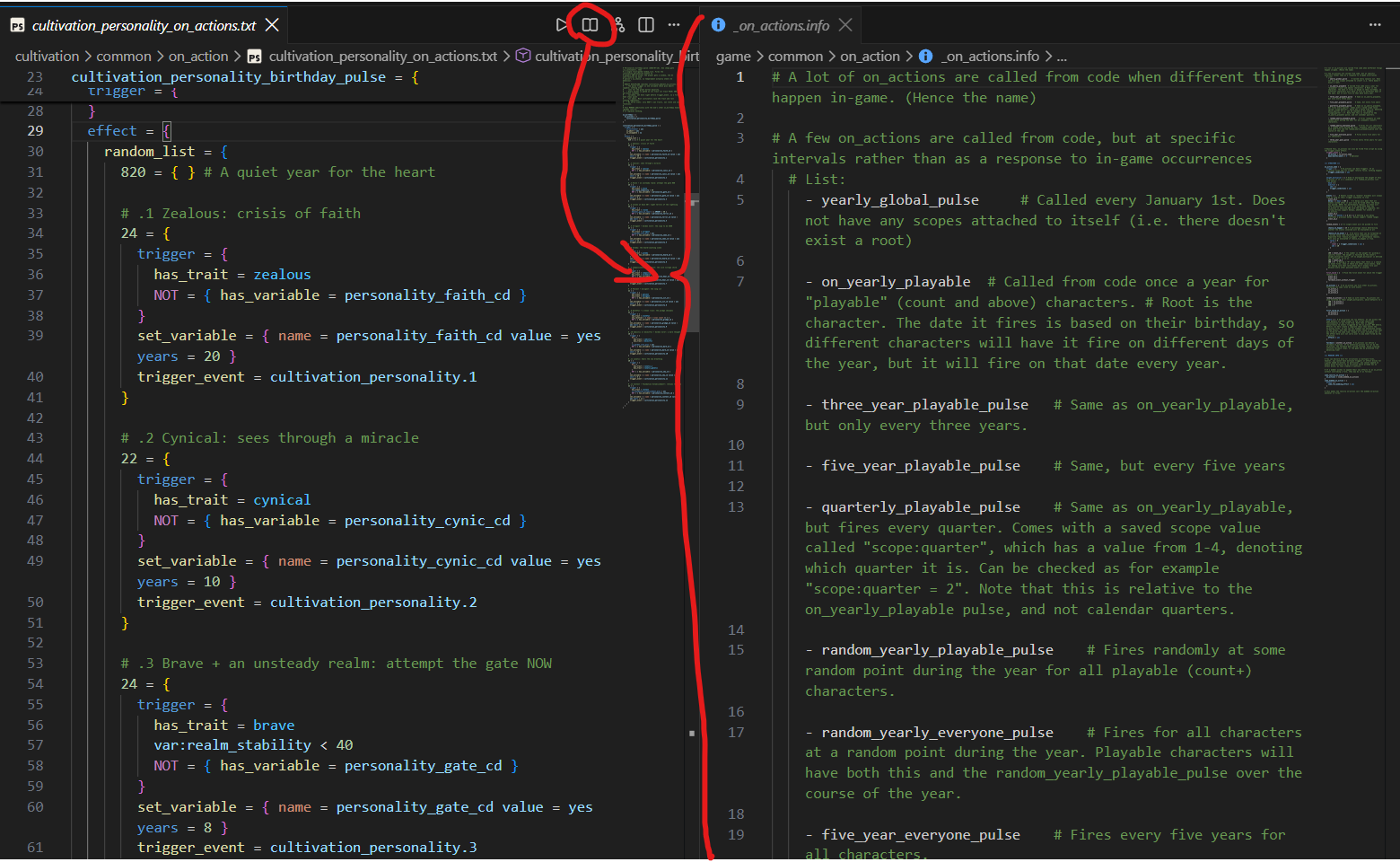
- Paradox: Open Vanilla Examples, from inside an
.infodoc, lists the vanilla files in the same folder so you can jump from the schema straight into working examples. - Paradox: Show Examples Wiki browses every name the toolkit knows, with vanilla example code inline, and Paradox: Open Wiki opens the hub that holds it next to the image guidelines and the diagnostic pages. Both are in Examples Wiki.
Color picker#
Every rgb { }, hsv { }, hsv360 { }, hex { } and color = { } value in script and .gui files gets a swatch. Click it for the color picker, click the label to cycle formats. The conversions are measured against vanilla: Jomini hsv hue runs 0..1, not 0..360, which other tools get wrong. It ships over standard LSP, so it works in every editor, not just VS Code.
BBCode descriptions#
A Steam Workshop description is written as BBCode. .bbcode files have syntax highlighting and their own icon. Since 0.5.0, Reopen Editor With... > BBCode Preview opens the rendered view through VS Code's editor selector. Use Open BBCode Source to return to text, or Open BBCode Preview to the Side to keep both visible. Preview follows unsaved text and does not change the document's language mode. Edit as Markdown remains available as a separate conversion workflow. See Steam BBCode.
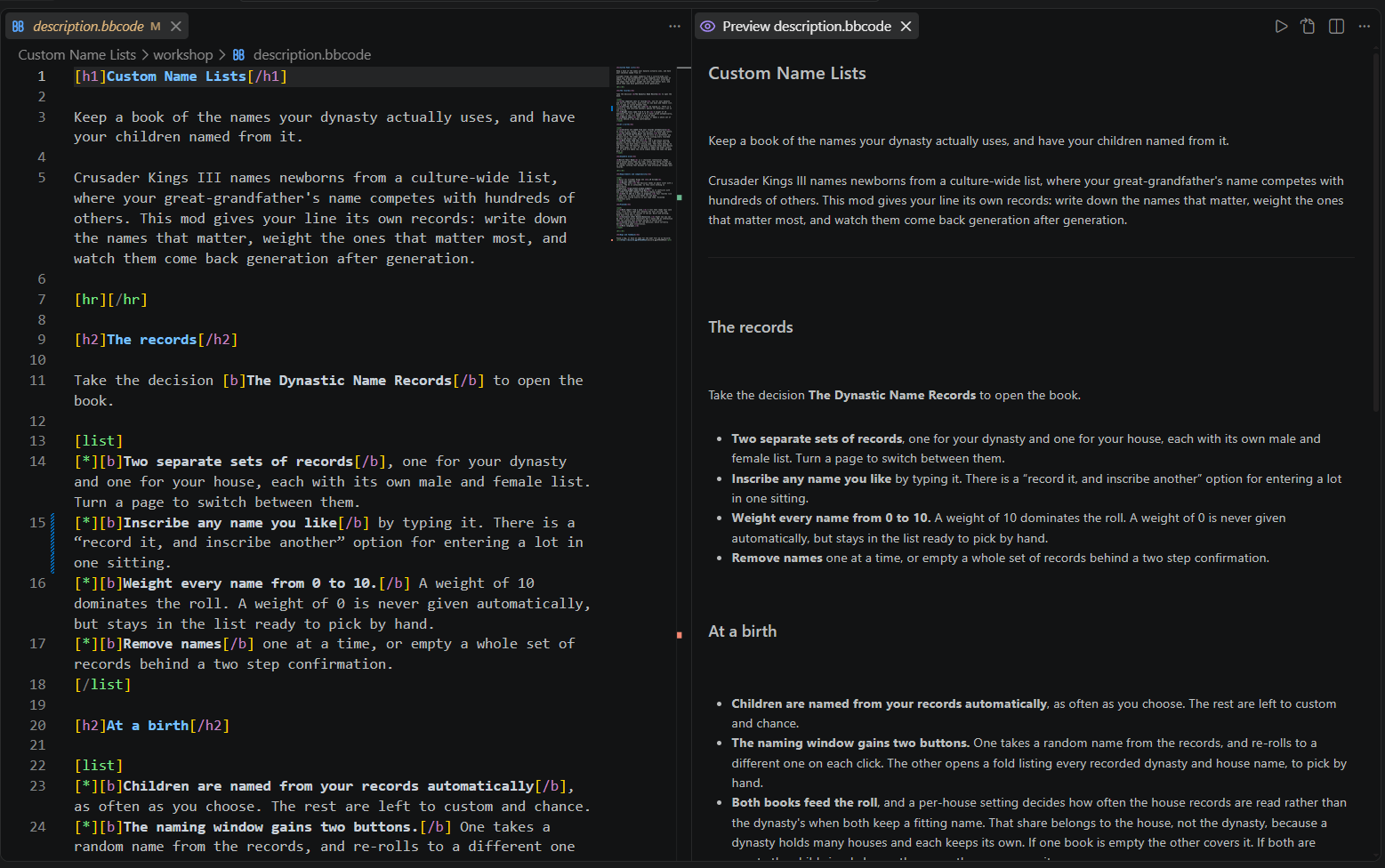
Where the file lives is on Multi Mod and Translation.
Snippets, formatter, and inline suppression#
Skeletons measured from the game. Typing at the top of a script file offers the skeleton of that folder's definition kind (new event, new decision: 119 kinds for Crusader Kings III, 93 for Victoria 3), and an empty line inside a definition offers its common child blocks (option block). A skeleton is the shape the game's own files write most: the keys present in at least half of the vanilla definitions of that kind, in their usual order, with the most written value or number pre-filled as a tabstop.
Paradox: Insert Snippet (definition skeleton, block) (Ctrl+Alt+I, or the palette) lists the skeletons together with the engine's own block examples that fit the cursor. Bare LSP clients get the same items as plain text (Outside VS Code).
A deliberately conservative formatter handles indentation only (it will not reflow your script). To silence a specific diagnostic on one line, drop a # px:ignore <code> comment on it (or # px:ignore-next-line <code> above it); a bare # px:ignore silences the whole line, and a trailing -- reason documents why. This works for both the toolkit's structural checks and tiger's reports. Full details and the code list are in Configuration.
GUI and data-binding#
.gui files get completion (properties ranked by real vanilla usage per widget type, using = templates), hover with usage stats, brace diagnostics, folding, a full widget outline, and go-to-definition through using splices and base-type chains. Bracketed data-binding expressions ([Character.GetFather...]) complete and chain through return types in both .gui and localization files.
For the structural view see the GUI Widget Tree in Sidebar Views; for working on a .gui file visually see GUI Editor.
When something goes wrong#
- The Paradox Modding Toolkit output channel is the log. An unhandled server error writes a
FATALline with its stack there before the process goes down, a failed index build logs the phase that failed, and every server start, stop and restart is logged with the restart decision. A dead server no longer looks like "only syntax highlighting works" with no explanation. px.trace.perfturns on a millisecond timeline for every request, rescan and indexing phase, so a slow save can be reported as numbers instead of a feeling.px.trace.servertraces the LSP conversation itself.