
GUI Editor
Inspect, arrange and edit game interfaces with a visual layout editor.
A .gui file, drawn by the measured layout engine and editable with a mouse. Open it with Paradox: Open GUI Editor, Ctrl+Alt+P, or the preview icon on a .gui editor title.
CK3 and Victoria 3. The layout engine was calibrated against CK3 in-game screenshots and extended to draw Victoria 3 files (declared types preview without an instance, multi-line data functions parse). EU5 gets .gui language support and the widget tree, but not the visual editor. See Supported Games.
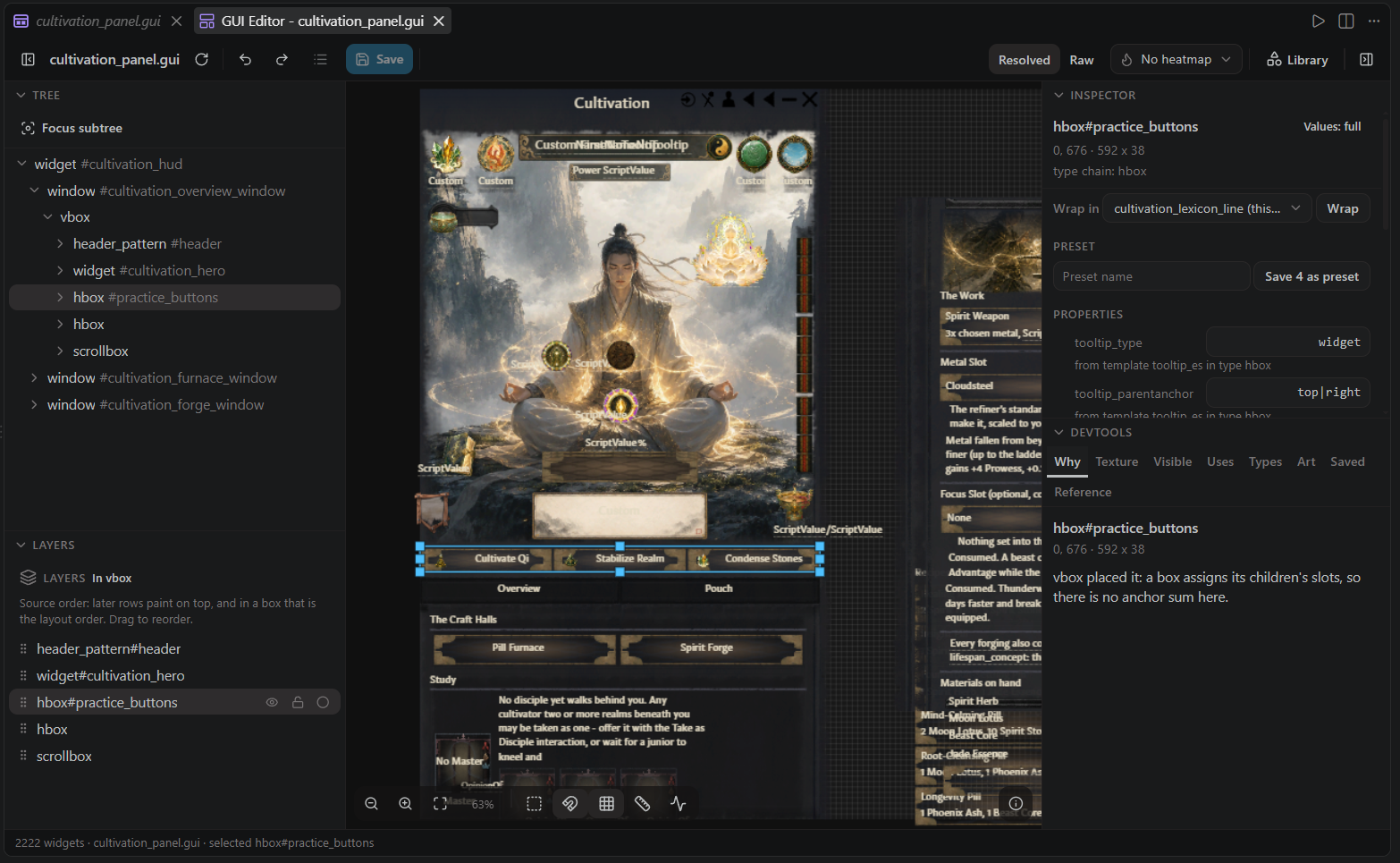
This replaces the old GUI Layout preview, which is retired: the editor does everything it did and more. If you only ever wanted to look, open the file read-only and the editor is that.
The three things that make it an editor, not a preview#
It writes your file, not a copy of it. Every gesture is ONE surgical edit over the exact span the entry occupies, so comments, tabs, CRLF and single-line bodies come back byte for byte. This is verified by round trips over all 373 vanilla .gui files, not just fixtures.
It writes the value, not the cursor. A drag commits the widget's own effective position plus the drag delta, never the world coordinate under the pointer. A widget positioned through anchors, margins or a parent's content box lands where you dropped it instead of jumping.
It turns a gesture down before it moves. The guards are asked when the mouse goes down, so:
- dragging a child of an
hboxorvboxis refused in the server's own words ("places its children itself"), with nothing having moved and nothing to snap back, - a child expanding on both axes refuses resize, and one expanding on a single axis writes the other with a warning naming the axis the container owns,
- a content-sized container ignores an explicit
size, and says so, - a drag that rounds to less than a pixel says so rather than silently doing nothing.
A refusal is an answer, not an error. The alternative would be writing a position line the game quietly drops.
Saving and the change log#
Edits land in the open document, not on disk: the editor and the text editor share one file and one undo history, so the canvas follows typing, formatters and reverts in the text editor too.
- Save (
Ctrl+S, or the toolbar button) writes the document to disk. The button lights up whenever something is unsaved. - The Changes button lists every edit this panel made this session, newest last, with a per-row undo that takes the document back to before that change.
- Undo and redo in the toolbar are session-scoped: they take back this panel's own changes but never reach past what this session did, so the file's older history stays the text editor's to undo.
- The ? button opens the built-in tour covering all of this.
Selecting and moving#
- Click selects the smallest rect under the cursor, not the anchored box filling the window behind it.
- Alt+click steps outward through the stack.
- Ctrl+Shift+click jumps to the declaration in the text editor.
- Shift+click and marquee build a multi-selection.
- Drag moves; the resize grips size. Smart guides snap to sibling edges, centers, equal spacing and equal sizes, with an optional 8px grid, and a live x/y/w/h readout plus live inspector values follow the gesture.
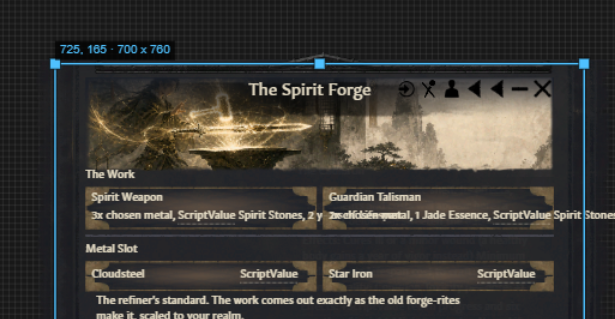
- Arrow keys nudge the selection: 1px, 10px with Shift, one grid step with Alt, committed as one undo step.
- Alt+drag duplicates. Delete deletes (with a confirm when it is many). Tab / Shift+Tab walk siblings, Enter / Shift+Enter step into and out of the hierarchy.
- Dragging a widget inside a box shows a drop line and commits a reorder.
- Middle-mouse drag pans; Shift+F zooms to the selection, Home fits the window.
ffocuses a subtree: the tree, the canvas and hit-testing all scope to that branch, with a breadcrumb back out.
With several widgets selected, move, nudge, delete, duplicate, align and distribute all commit as one undo step. If one member is refused, it is skipped with its reason shown verbatim and the rest proceed.
The tree and the inspector#
The tree lists source children in source order and marks the ones a template or type spliced in. A window_character-sized document opens with its tree collapsed rather than listing 13,702 rows.
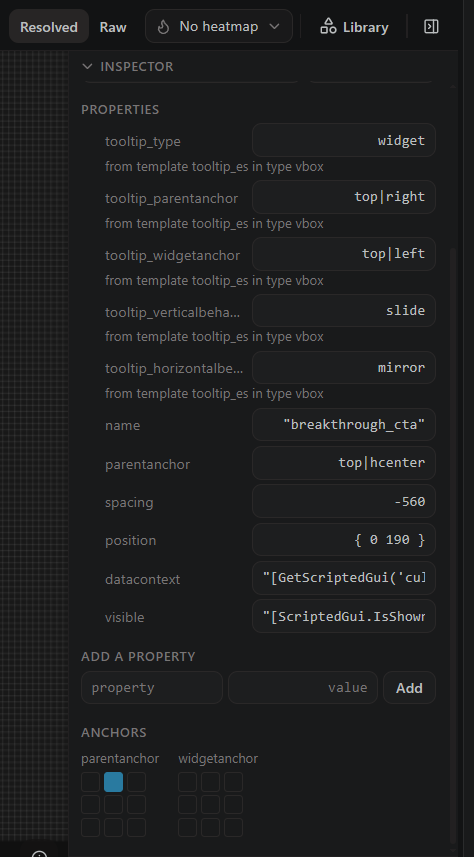
The inspector shows every property with the template or type it came from, and editing a row writes an override at the use site. Values read as text until you click them; then they become the right input for the type: a number you can scrub sideways, a choice chip for enumerable values, an anchor grid for parentanchor and widgetanchor. On top of that:
- An add-property row with completion from the harvested widget vocabulary: per-type property names plus the tree-wide ranking, and values complete too where the engine has a vocabulary.
- Block values such as
background = { using = X alpha = 0.7 }open into a sub-editor with one row per entry, rows addable and removable, committed as one write. - A display mode per property value (full, abbreviated with the full value on hover, or hidden), remembered per workspace.
- It holds its place: committing a value does not jump the scroll to the top, and text typed into one field survives a commit in another.
- Wrap in encloses the selection in a new container, offering the containers that make sense at that spot, and Save as preset stores the selected property bundle under a name.
Localization, resolved#
Text widgets show their resolved localization by default, measured at its resolved size, so the canvas reads like the game instead of like key soup. A Resolved / Raw toggle switches the whole canvas.
Data functions the editor cannot know (GetPlayer.GetName) render as muted dotted chips, and hovering a text shows every segment: which part is a loc key, which is a variable, and what it resolved to.
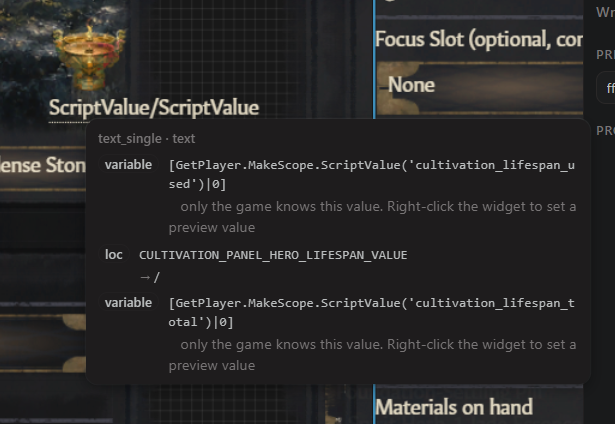
For values only the running game knows, right-click the widget and Set preview value: your answers are stored in <mod>/<configDir>/gui-preview-values.json, shared with the mod, and applied to every preview. The inspector also offers Create localization for a key that does not exist yet.
Layers, guides and reordering#
A layers panel over the selected widget's container:
- eye hides a widget in the preview (a fast way to declutter a busy window while you work),
- lock stops it swallowing clicks,
- solo dims everything else,
- hover flashes its outline,
- dragging rows reorders source order through the writer, labeled as layout order inside an
hboxorvbox, because that is what source order means there.
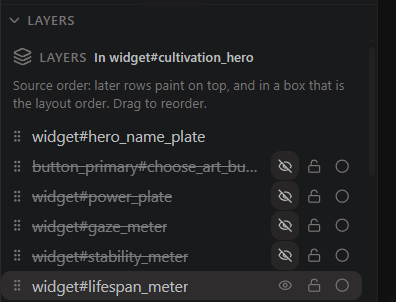
Reorder indices count the declarations a preview cannot see. A blockoverride sitting between two widget children used to shift every later index by one; a layers drag now moves exactly the block you dragged.
Adding content: the element library#
The Library button opens the element library: every insertable element previewed as the game draws it, in a searchable, paged tile grid with sections for this file's own types, the templates and widget types available here, and your saved components. Click a card to add it to the selected container, or drag it onto the canvas.
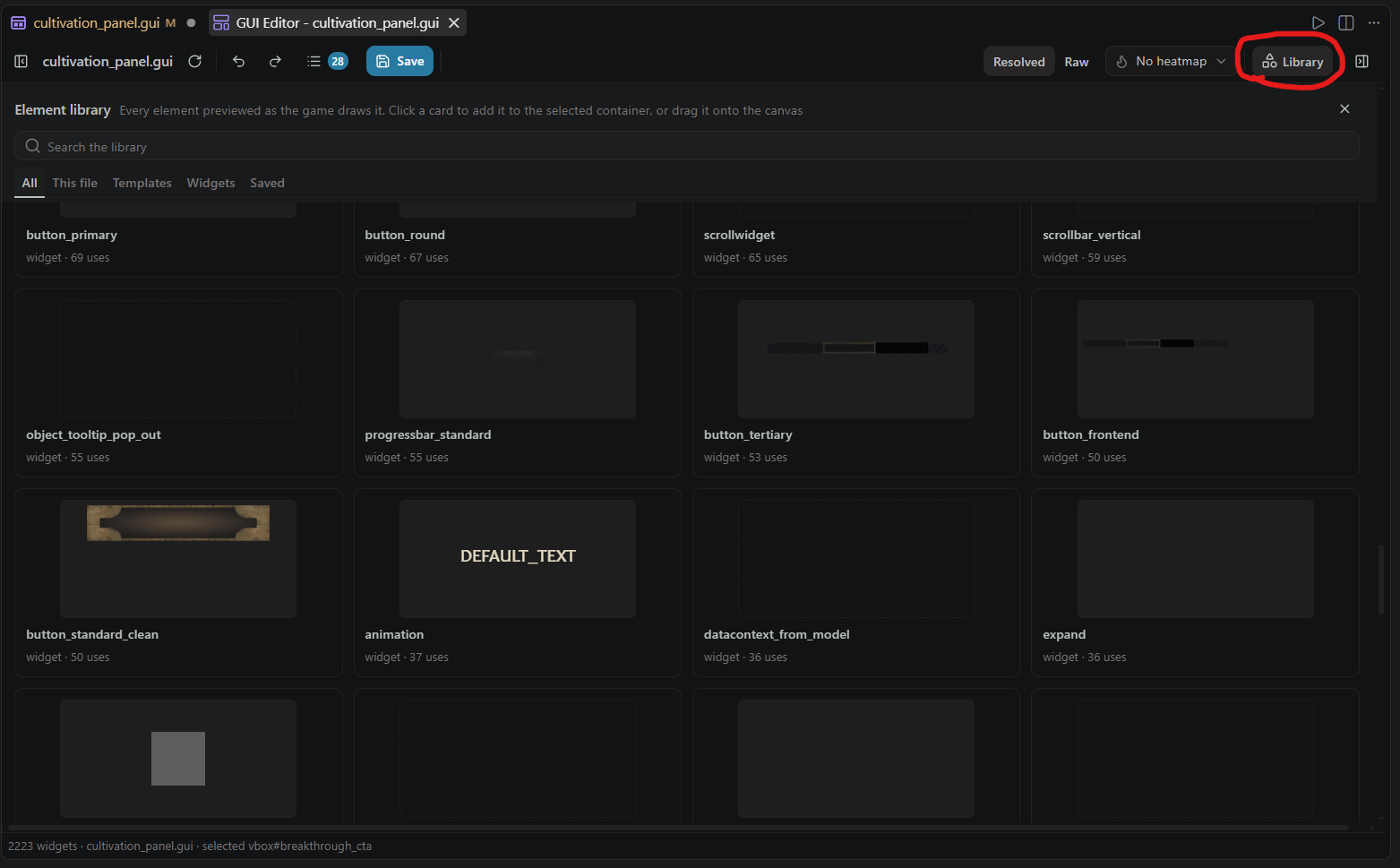
The library offers only what the harvested vocabulary and the document itself declare, never something invented from memory, and each tile carries its real vanilla usage count. Beyond the library:
- Copy puts the widget's verbatim block on the clipboard; paste re-inserts it.
- An anchor picker offers exactly the anchor words the layout engine parses.
- Texture and type browsers pick values from the mod and game trees.
- A selection can be saved as a named component, and property bundles as presets. Both are stored in your workspace; none ship bundled.
Understanding what the engine did#
The devtools panel has eight tabs:
- Why: sums the engine's own placement terms to the widget's rect origin, names the layout container that dropped an authored position, the clipping ancestor, and the template value each property overrides.
- Texture: the sheets the selected widget draws, and the frame it shows.
- Visible: how the preview treats conditional visibility: show all, hide all, or evaluate with per-check answers the editor remembers per document.
- Uses: links the selected widget to its
scripted_guis (file and line, used-by counts), the event chains that reach them, and its loc keys with the missing ones flagged. Every row is click-through. - Types: the widget types and templates available here.
- Art: browse the
.ddsfiles under the mod's and the game's gfx trees. - Saved: your saved components and property presets.
- Reference: lay an in-game screenshot over the canvas to compare the two.
On the canvas itself:
- A constraint overlay draws parent bounds, the anchor crosshair and link line, the clip rect, and expanding-axis arrows.
- Heatmaps tint by nesting depth, by clipping (what a scrollarea or scissor cuts), or by synthetic origin (template-spliced widgets), plus optional layout-change pulses.
- A stats line with the server's per-stage timings.
A container whose content the engine cannot statically measure is drawn as a dashed estimate box and counted in the status line, because the engine invents no pixels and the canvas should not pretend it did.
What the layout engine models#
Enough of PdxGui to be trusted on real files:
- Grid boxes for real:
fixedgridboxusesaddcolumn/addrowas the cell size and stride,dynamicgridboxpacks items at their own size, both fill down a column by default and transpose withflipdirection,maxhorizontalslotscaps a row, andsetitemsizefromcellmakes every cell the widest item's. - A hidden child collapses out of an
hbox/vboxand its siblings shift up (ignoreinvisible). - A
resizeparent = yeschild resizes its parent to its own content. - A
containerand a datamodelitemsize to their content, so an empty container collapses instead of holding itssizeopen. scrollboxandscissor = yesclip likescrollarea.- A flowcontainer honors a child's
parentanchoron the cross axis. - A
minimumsizefloors a shrinking child, and the deficit redistributes over the rest.
For tool authors#
The gesture layer is a documented wire method, paradox/guiSourceEdit: one request takes a gesture (set or remove properties, reorder, insert, paste, delete, duplicate, wrap, or copy a block out) and answers with surgical text edits the host applies, or with a refusal that says why. Blank separators and attached comments travel with the widget they belong to, so a reorder is a pure permutation and an insert and a delete are exact inverses.
paradox/guiWidgetEdit still works as a deprecated alias over the same core, with one behavior change: a property it has to insert lands on its own line before the closing brace, where the writer puts every new property, instead of first in the body.
See the Protocol Reference and Outside VS Code.
Source actions (0.5.0)#
Source-backed widgets expose native PX source actions alongside the editor's own editing controls. Shift+F10 or the context-menu key opens the native menu on a focused source-backed item. Actions use that widget's source location.